Monday, 7 January 2013

UNIT 43 P1 (CORRECTIONS)


UNIT 43 TASK 1


MULTIMEDIA: 
Multimedia is media and content that uses a combination of different content forms. This contrasts with media that use only rudimentary computer displays such as text or printed material 


-Sound: I will be using sound effects a lot in this project and I will use them in interactive portions and generally to narrate for those who are blind. The sound used will be clear and easy to hear and will generally be utilized for the visually impaired, to do this the recordings will be tested and cleared up using post recording software. This will enable me to produce a clear and user friendly sound set.

-Images: Images will be used on the most of the parts of the project and will often have a narration and underlining subtitles to accommodate for those suffering for a disability. The images will be high quality to ensure they can be easily viewed by the users, this can be achieved by using a high quality camera for all photographic needs , the use of low quality camera-phones will only hinder the professionalism of the project

-Video: Several clips will be used on the various parts and will make up at least a solid 50% of the project from teachers views on the subjects and clips of what the child will learn at Kingswood. Using the media dept. HD video cameras to film all videos and post filming editing to make the video seamless and professional will help to add a high sense of quality also subtitles will need to be included, which is a simple process handled in the editing phase.

BUSINESS REQUIREMENTS: the requirements of the project will be to inform people that the ‘’History’’ department is a critical part of a child’s education and to educate people the benefits of the subject as well as promote a good educational environment for a child to learn and also the school in general.

BUSINESS OBJECTIVES: the objective of the project is to advertise the school to potential students and their guardians and it particular the ‘’History’’ department and to make sure that the informing of history being a critical subject in a child’s education is achieved as well as to provide entertainment to the viewer.

TRAINING:  the people who are viewing my project will need to be computer literate as well as being able to understand how to use dvd-roms and how to use the corresponding players.

AUDIENCE: the audience of my project will be potential students of the Kingswood school so the children’s will be about 10-11 years old (simple wording, lack of jargon and more fluent video to keep attention). The project will also have to be viewed by their parents and guardians who will be adults. 

UNIT 43 M1


UNIT 43 M1
After posting my first draft of my project, I proceeded to question a number of my peers to ask their opinions on any modifications that could be made towards my design and layout to make it more user friendly.
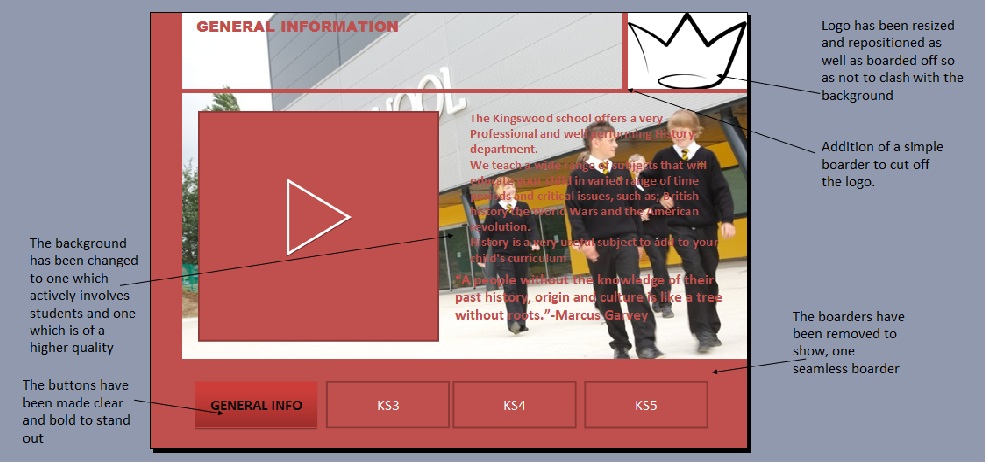
After consulting them, the following corrections needed to be addressed:
- The text on the slides needed to be bolder to make them easier to read. As vision impaired users would   find it hard to read the text some of which is important to the purpose of subject advertisement.
- The boarders on each slide did not match and made the design appear un-profession and tacky. The project would reflect the standard the school delivers and thus must be high to show to potential students that the school is one that will deliver.
- The logos needed to be resized and repositioned to make them fit in more.  As currently they are too big and often draw attention away from the important sections of the project.
- The background image was too blurry and needed to be changed to a better quality one. The image was unclear and did not serve a purpose in the project, a better quality vector image was needed to show the high, professional standard needed.
- The hyper-linked buttons needed to be made clearer. As they did not clearly look like hyper-linked buttons, they looked more like page references  

Below are attached images of the modifications to the design.


Friday, 30 November 2012

UNIT 18 P7


 P7
PREDICTION
-Correctly fill out form
(Presence check)
          
Form correctly filled out and all information was correct. The form is then                                                                                                               accepted into the data base and therefor added to the members table.    

-Incorrectly filled form
(Age wrong)

Form will not be accepted and an error message shall appear with the underage message or the overage
-unfilled form

Form will not be accepted as there are too many null fields
-query

The Query will take all reviews and separated into a different report in they were created in certain months
- Macro’s

The Macro will create an error message when fields are left empty or if any of the critical data is left blank
-Age check
The DOB calculator will generate the persons age if the information is put correctly into the form
-username generator

The equalization used will take the first 3 letters of their Forename and the first 3 of the surname and the corresponding number after the last generated username.
-list check

A check on films  that includes the film months and their respective genres
-input mask
Amount paid will be set to a default of 00.00 for easer use.


-format check
DOB is placed in short date format

AGE CHECK
                                                               FORMAT CHECK
                                                                                INPUT MASK
                                                                          LIST CHECK


                                                                       MACRO
                                                                 
PRESENCE CHECK
                                                                       QUERY
                                                               UNFILLED FORM
                                                              USERNAME GENERATION

Thursday, 29 November 2012

UNIT 43 TASK 1


UNIT 43 TASK 1

MULTIMEDIA: Multimedia is media and content that uses a combination of differentcontent forms. This contrasts with media that use only rudimentary computer displays such as text-only or traditional forms of printed or hand-produced material. 

-sound: I will be using sound effects a lot in this project and I will use them in interactive portions and generally to narrate for those who are blind.

-images: images will be used on the most of the parts of the project and will often have a narration and underlining subtitles to accommodate for those suffering for a discipline

-video clips: several clips will be used on the various parts and will make up at least a solid 50% of the project from teachers views on the subjects and clips of what the child will learn at Kingswood 

BUSINESS REQUIREMENTS: the requirements of the project will be to inform people that the ‘’History’’ department is a critical part of a child’s education and to educate people the benefits of the subject as well as promote a good educational environment for a child to learn and also the school in general.

BUSINESS OBJECTIVES: the objective of the project is to advertise the school to potential students and their guardians and it particular the ‘’History’’ department and to make sure that the informing of history being a critical subject in a child’s education is achieved as well as to provide entertainment to the viewer.

TRAINING:  the people who are viewing my project will need to be computer literate as well as being able to understand how to use dvd-roms and how to use the corresponding players.

AUDIENCE: the audience of my project will be potential students of the Kingswood school so the children’s will be about 10-11 years old (simple wording, lack of jargon and more fluent video to keep attention). The project will also have to be viewed by their parents and guardians who will be adults.